
Multiplayer
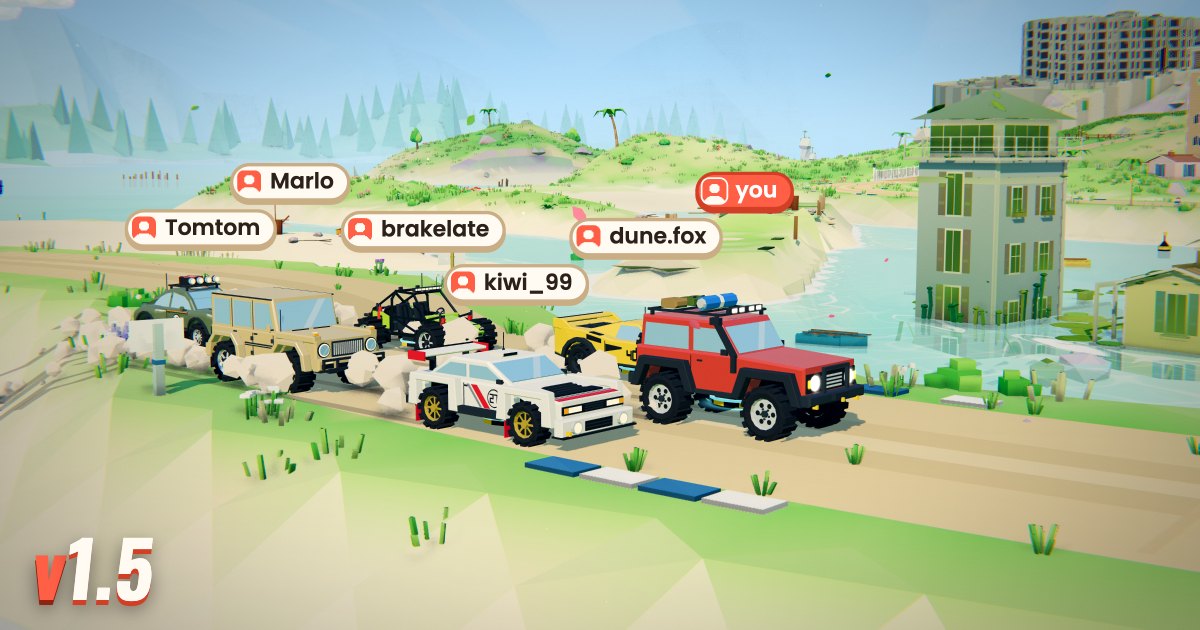
Hoone 1.5 brings other players onto the map. You still drive your own run on your own clock, and everyone else on the map drives along beside you as a live car. Cars pass right through each other, so nobody can bump you or block your line.
Other drivers
- Multiplayer is on by default. Up to 20 drivers share a map at once, each with their name over their car.
- The Online button in the corner shows who is on your map and their best time there. Their dots are on the pause map too.
- Want to drive alone? Turn Multiplayer off in that card, or set Their cars to Faint or Hidden.
- Curious how someone takes a corner? While you race, pick Spectate from the menu next to a driver's name. Back to my car takes you back.
Private rooms
- Open the Room tab on the start screen and make a room. Share its link or its code, and your friends join with one click. A room holds up to 20 players.
- Everyone's car parks in a castle hall on the start screen, so you see who is there before you drive.
- The host picks the map: a daily map, a random one from Easy to Extreme, or a seed. Everyone else gets a Follow button, and nobody is pulled along.
- The host starts the game for the room. Join later and you drop straight in.
- The host can hand the room to someone else or remove a player. If the host leaves, the room gets a new one.
- In a room, the leaderboard shows only the players in it.
Chat
- Chat with the others on your map. Press Enter or T to write.
- On public maps chat needs an account. In a private room everyone can chat, guests too.
- Finished a good run? Post your time in the chat with one click from the finish screen.
- Mute anyone you don't want to read. Signed-in players can report a message, and a message reported three times is hidden for everyone.
Friends
- Your profile has a new Friends page. Add friends by their name, or straight from the leaderboard, the chat or a room.
- See who is online and which map they are on. Ask to join them, or invite them to your room.
- Switch the leaderboard to Friends to see only your friends' times.
Also new
- A new font for text in the game and on the site. Times and numbers keep their old look.
- No more all-caps buttons and headings.
- The Last runs button moved to the bottom right corner.
Questions or something not right? Write to support@hoone.net.
